

You've probably heard about browser extensions that can help you get money back when prices drop after you buy something on Amazon. Maybe you've even tried one. But have you ever wondered: how do these things actually work?
More importantly: Is it safe? Is it legal? Will Amazon ban my account?
These are all valid questions—and in this article, we're going to pull back the curtain and show you exactly what happens behind the scenes when a price adjustment extension like TaskMonkey goes to work.
The 4-Step Process: From Scan to Refund
Every price adjustment extension follows a similar workflow, though the level of automation varies. Here's the complete process broken down into four steps:
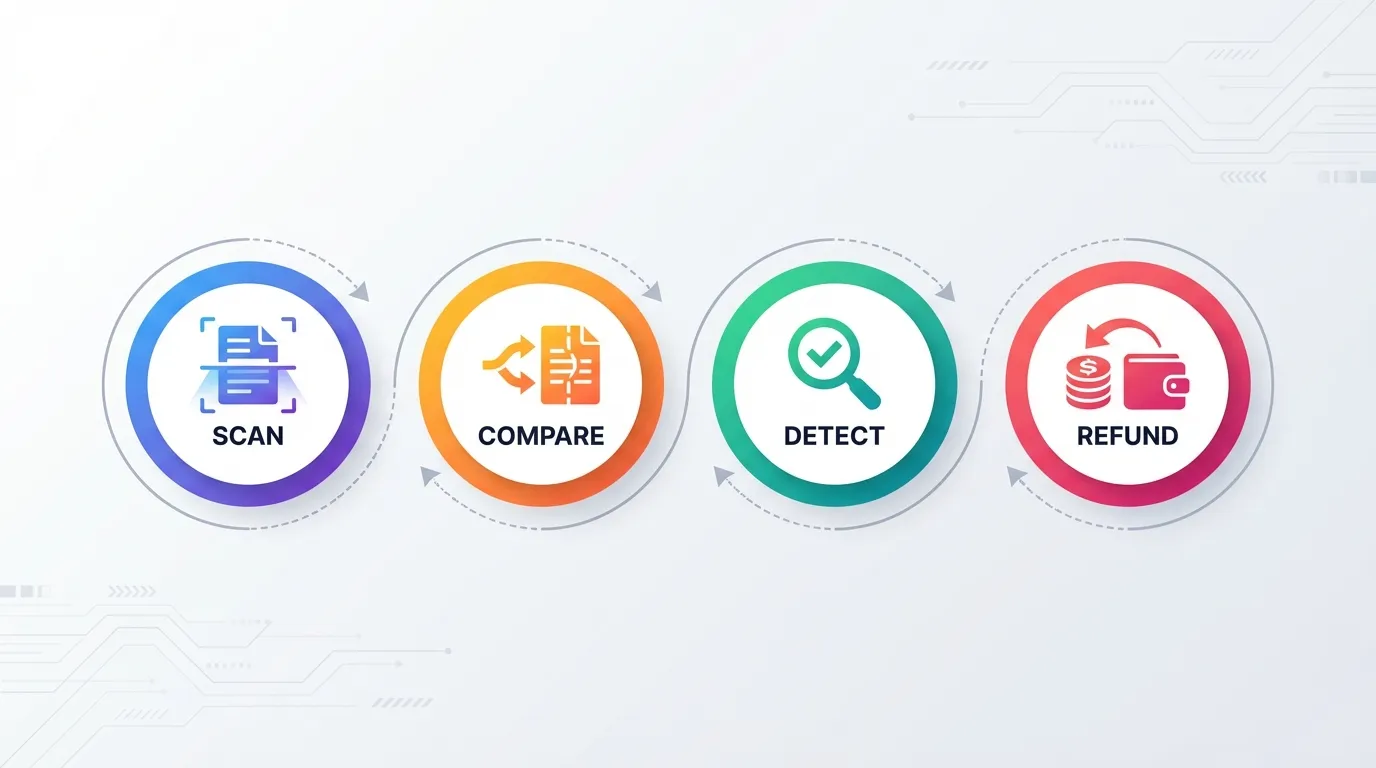
Step 1: Scan Your Order History
When you click "Start Saving Now" in TaskMonkey, the extension opens your Amazon account in a new browser tab. It then navigates to your order history and systematically opens each order from the past 3 months.
During this scan, the extension reads:
- What products you purchased
- When you bought them
- How much you paid
- The product identifiers (ASINs)
This happens within your own browser, using your existing Amazon login session. The extension doesn't need your password—it works because you're already signed in.
Step 2: Compare Current Prices
Once the extension has your order data, it checks the current price of each product on Amazon. This comparison happens in real-time, pulling fresh pricing data directly from Amazon's product pages.
According to Profitero's research, Amazon changes prices on millions of products up to 2.5 million times per day. This constant fluctuation means there's a good chance something you bought recently is now cheaper.
Step 3: Identify Eligible Price Drops
Not every price drop is worth pursuing. The extension filters results to find the best opportunities:
- Significant drops: Usually $5 or more (smaller amounts aren't worth the effort)
- Recent purchases: Items bought within the return window have higher success rates
- Sold by Amazon: First-party items are more likely to receive courtesy credits
- Not Lightning Deals: Limited-time promotional prices are typically excluded
At the end of this step, you see a dashboard showing all the potential savings found—before any money is actually requested.
Step 4: Request the Refund or Credit
This is where extensions differ dramatically. Basic tools will simply tell you about the price drop and expect you to contact Amazon yourself. More advanced tools like TaskMonkey handle the entire negotiation automatically.
TaskMonkey opens Amazon's customer service chat, initiates a conversation, explains the situation politely, and requests a courtesy credit. The AI handles objections, provides order details when asked, and persists (politely) until a resolution is reached.
How Extensions Read Your Orders
One of the most common concerns about price adjustment extensions is data privacy. Let's address this directly: how does the extension actually access your order information?
Browser Extension Permissions
When you install a Chrome extension, you grant it specific permissions. A legitimate price adjustment extension only needs:
- Access to Amazon domains: This allows the extension to read and interact with Amazon.com pages
- Active tab permission: This lets the extension see what's on the current tab when you click its icon
A well-designed extension does NOT need:
- Access to all websites (only Amazon)
- Access to your browsing history
- Access to your passwords or payment info
- Ability to modify other websites
You can verify an extension's permissions before installing by clicking "View permissions" in the Chrome Web Store.
Read-Only Order Access
Price adjustment extensions read your order pages the same way you would—by opening them in a browser tab. They can see the HTML content of the page (product names, prices, dates) but cannot:
- See your payment methods
- Access your credit card numbers
- Make purchases on your behalf
- Change your account settings
The extension is essentially a sophisticated "copy and paste" tool that extracts order information from pages you already have access to.
Data Security
Reputable extensions like TaskMonkey follow strict data handling practices:
- Order data is processed locally in your browser when possible
- Any data sent to servers is encrypted (HTTPS)
- Personal information is not sold to third parties
- Data retention policies are clearly stated in the privacy policy
If you're concerned about privacy, read the extension's privacy policy before installing. Legitimate companies are transparent about what data they collect and why.
How TaskMonkey's AI Negotiation Works
This is where TaskMonkey differs from simpler price tracking tools. Instead of just showing you the price drop and leaving you to handle it, our AI takes over the entire conversation with Amazon customer service.
Here's exactly what happens:
Opening the Chat
TaskMonkey navigates to Amazon's customer service page and opens a live chat session. This is the same chat interface you'd use if you contacted Amazon manually—no special access or backend API is involved.
Starting the Conversation
The AI begins with a polite, clear message explaining the situation. Something like:
"Hi, I recently purchased [Product Name] on [Date] for [Price]. I noticed the price has dropped to [New Price]. I was wondering if there's any possibility of receiving a partial refund or credit for the difference. I'd really appreciate any help you can provide."
Notice the tone: friendly, specific, and appreciative. This isn't a demand—it's a polite request. And that's crucial to the success rate.
Handling the Response
Amazon customer service representatives (CSRs) respond in various ways:
- "Let me check that for you" — The AI provides order details and waits
- "I've applied a credit to your account" — Success! The AI thanks them and ends the chat
- "Unfortunately, we don't offer price adjustments" — The AI politely reframes the request as a "courtesy" or "goodwill" credit
- "The item was sold by a third-party seller" — The AI acknowledges and moves on
The AI is trained on thousands of successful conversations, so it knows how to navigate common objections and keep the interaction productive.
Receiving Credits
When successful, Amazon typically issues the refund as a promotional credit applied directly to your Amazon account. You'll see it on your next order, and you might also receive an email confirmation.
The average credit per successful claim is $15-30, though we've seen credits as high as $100+ for expensive electronics.
Is This Against Amazon's Policy?
Let's address the elephant in the room: Is using a price adjustment extension against Amazon's terms of service?
The short answer: No.
Here's why:
There's No Hacking Involved
Price adjustment extensions don't exploit security vulnerabilities, bypass authentication, or access systems they shouldn't. They use your existing browser session to do exactly what you could do manually—just faster and more systematically.
Customer Service Has Discretion
According to Amazon's own help documentation, they state "We don't offer price matching." However, this doesn't mean CSRs can't issue courtesy credits at their discretion.
As DealNews reports, "Amazon does offer unofficial courtesy credits for price adjustments, even though it doesn't publicly acknowledge a formal policy."
Polite Requests Are Normal
Millions of Amazon customers contact customer service every day to ask for price adjustments, shipping credits, or other accommodations. This is standard consumer behavior—not a policy violation.
TaskMonkey simply automates what people already do. We're not exploiting a loophole; we're scaling a normal interaction.
We've Processed Thousands of Claims
TaskMonkey has successfully processed thousands of price adjustment requests. We've never seen an account suspended or penalized for using our service. Amazon's response is either "yes, here's your credit" or "no, sorry"—never "you're banned for asking."
Why AI Negotiation Works Better Than You Think
You might wonder: can a robot really negotiate as well as a human? In this specific context, the answer is often yes—and sometimes better. Here's why:

Consistency
Humans get frustrated. We might phrase something poorly if we're tired, or come across as demanding if we've had a bad day. AI maintains the same polite, professional tone every single time—which matters when you're making dozens of requests.
Patience
Customer service chats can involve wait times. The AI doesn't get impatient or abandon the chat. It waits for responses, handles delays gracefully, and stays engaged until the conversation reaches a conclusion.
Data-Driven Optimization
TaskMonkey's AI learns from every interaction. When certain phrases work better than others, the system adapts. When new objections appear, we update the training. This continuous improvement means the success rate keeps climbing.
Scale
If you bought 50 items in the past 3 months and 8 of them have price drops, would you really want to have 8 separate customer service conversations? The AI handles this effortlessly, processing multiple claims while you go about your day.
Common Concerns Answered
Will using a price adjustment extension get my Amazon account banned?
No. Price adjustment extensions like TaskMonkey simply automate a polite conversation with customer service. This is the same thing millions of customers do manually every day. There is no policy violation, no hacking, and no risk to your account.
What is the success rate for AI-negotiated refunds?
TaskMonkey has a success rate of over 90% for legitimate price drop claims. Success depends on factors like how recently you purchased, the size of the price drop, and whether the item was sold by Amazon or a third-party seller.
Items purchased more recently (within 7-14 days) have higher success rates than older orders. First-party Amazon items are more likely to receive credits than third-party marketplace products.
Do I need to do anything during the refund process?
No. Once you click "Start Saving Now," TaskMonkey handles everything automatically. The AI scans your orders, detects price drops, opens customer service chat, negotiates the refund, and the credits appear in your Amazon account. You can literally walk away and come back to find money waiting.
How long does the whole process take?
A typical scan of 3 months of orders takes 10-15 minutes. The negotiation phase varies depending on how many price drops are found and customer service wait times. Most users see results within 30-60 minutes of starting.
What if a claim is denied?
Not every claim succeeds—and that's okay. Some items are sold by third parties who don't offer adjustments. Some price drops are from Lightning Deals that aren't eligible. When a claim is denied, TaskMonkey simply moves on to the next one. You're only charged for successful claims.
Is my personal information safe?
TaskMonkey follows strict security practices. We don't store your Amazon password, don't access payment information, and don't sell data to third parties. All communication is encrypted, and we're transparent about our privacy policy.
Ready to See It in Action?
Now that you understand how price adjustment extensions work, there's really only one question left: how much money are you leaving on the table?
The average TaskMonkey user recovers $200+ per year—money from price drops they would have never known about otherwise. And with our "success only" pricing model, you only pay when we actually get money back for you.
The scan is free. The detection is free. You only pay 20% of what we successfully recover. If we don't save you anything, you pay nothing.
Try TaskMonkey now and see how much you could be saving.
Related Articles in This Topic
- Price Adjustment Extension: Get Your Money Back Automatically in 2026
- Best Price Adjustment Extension for Chrome in 2026
- Automatic Price Adjustment Extension: Set It and Forget It
- Amazon Price Adjustment Extension: How to Get Refunds After Price Drops
- Price Adjustment After Purchase: How Extensions Track Price Drops for You
- Best Price Adjustment Extensions in 2026: Complete Ranking and Reviews
- Price Adjustment Extension vs Honey: Which Actually Saves You More?
- Price Adjustment Extension vs Keepa: Tracking Prices vs Getting Refunds
- Price Adjustment Extension Comparison